
산업 현장이나 정밀 작업에서 흔히 사용하는 USB 현미경은 제조사에서 제공하는 기본 뷰어 프로그램이 무겁거나, 실시간 오버레이(십자선), 커스텀 화질 조정, 단축키 캡처 등의 편의 기능이 아쉬울 때가 많습니다.
이번 포스팅에서는 C# .NET 4.5와 AForge.Video 라이브러리를 활용해, USB 카메라 경량화 제어 프로그램을 개발한 과정을 공유합니다.
본래 무료로 풀려 있던 프로그램을 사용 중이었으나, PC 환경 변경후 USB 카메라가 인식이 불가하여 요구조건에 맞게 새로 만들게 되었습니다.
주요 기능 및 특징
- 실시간 십자선 오버레이 & 클린 캡처
- 라이브 뷰 화면에는 정렬을 위한 십자선(Crosshair) 가이드라인을 표시하고, 스페이스바나 버튼으로 저장되는 원본 이미지에는 오버레이가 포함되지 않은 순수(Clean) 프레임만 깔끔하게 저장됩니다.
- 드라이버 독립형 화질 조정 (밝기, 대비, 선명도)
- 하드웨어 드라이버 제어의 한계를 극복하기 위해
BitmapData를 이용한 고속 픽셀 레벨 조작 방식을 적용했습니다. - 밝기(Brightness), 대비(Contrast), 선명도(Sharpness)를 퍼센트 단위로 실시간 조절할 수 있습니다.
- 하드웨어 드라이버 제어의 한계를 극복하기 위해
- 사용자 편의 인터페이스 (UI/UX)
- 평소에는 카메라 화면을 넓게 쓰기 위해 숨겨둘 수 있는 접기/펼치기(Toggle Settings) 패널 적용
- 창 크기 조절 및 최대화 지원
- 키보드 스페이스바(Spacebar) 단축키를 통한 즉시 캡처 기능
- 로컬 설정 파일 유지 (
MicroscopeViewer.config)- 복잡한 윈도우 레지스트리를 사용하지 않고, 프로그램 실행 파일과 같은 폴더에
MicroscopeViewer.config파일을 생성하여 마지막으로 사용한 저장 폴더 경로를 안전하게 유지합니다. (USB 이동식 디스크에서도 설정이 그대로 따라다님)
- 복잡한 윈도우 레지스트리를 사용하지 않고, 프로그램 실행 파일과 같은 폴더에
개발 환경 (Environment & Tech Stack)
- Language: C# (.NET Framework 4.5 / 최신 .NET 환경 호환)
- IDE: Visual Studio Code (VS Code)
- UI Framework: Windows Forms (WinForms) – 코드 기반 동적 컴포넌트 배치 방식
- Core Library:
AForge.Video(v2.2.5)AForge.Video.DirectShow(v2.2.5)
VS Code에서 C# USB 현미경 프로젝트 처음부터 만들기 (Step-by-Step)
Visual Studio Code에서 .NET 윈도우 폼 프로젝트를 처음부터 구축하는 전체 과정을 안내해 드립니다. (최신 .NET 환경인 net8.0-windows를 기준으로 설명해 드릴게요. VS Code에서 CLI와 NuGet 패키지를 쓰기가 훨씬 깔끔합니다.)
1단계: 필수 프로그램 준비
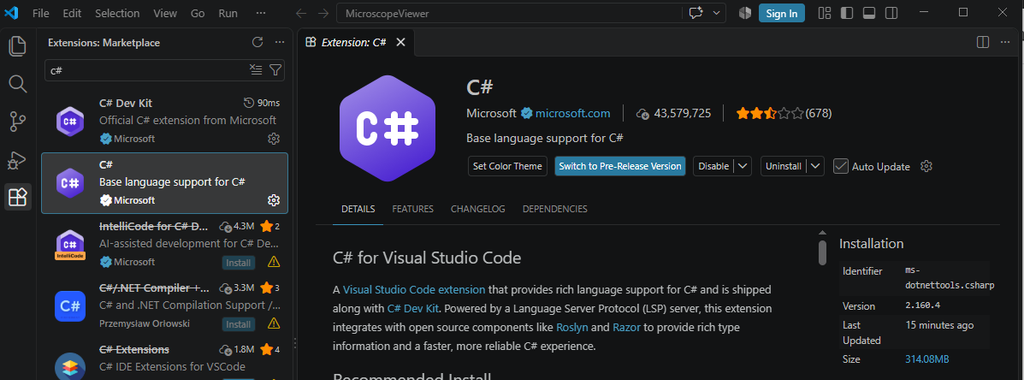
- VS Code 설치 및 C# 확장 프로그램(C# Extension) 설치
- NET SDK (.NET 4.5 이상 Windows용) 설치 (명령 프롬프트에서
dotnet --version으로 확인 가능)
VS Code : https://code.visualstudio.com
2단계: 프로젝트 폴더 생성 및 초기화
- PC에 작업할 빈 폴더(예:
MicroscopeViewer)를 하나 만듭니다. - 터미널(CMD 또는 VS Code 내장 터미널)을 열고 해당 폴더로 이동한 뒤 아래 명령어를 입력하여 윈도우 폼 콘솔/앱 프로젝트를 생성합니다.
dotnet new winforms -n MicroscopeViewer
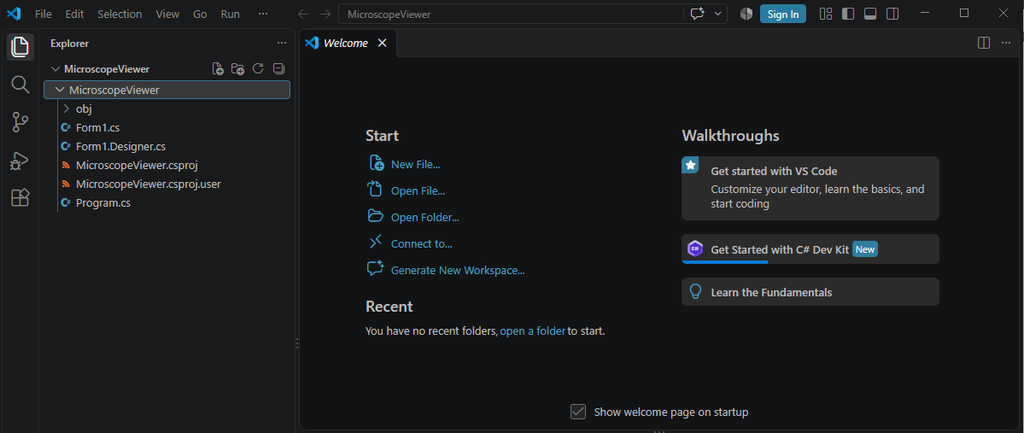
이렇게 하면 기본적으로 필요한 .csproj와 Program.cs, Form1.cs 기본 뼈대가 자동 생성됩니다.
3단계: 프로젝트 파일(.csproj) 설정 확인
프로젝트 폴더 안에 생성된 MicroscopeViewer.csproj 파일을 열어, 윈도우 환경에서 실행되도록 타겟 프레임워크가 아래처럼 설정되어 있는지 확인합니다.
<Project Sdk="Microsoft.NET.Sdk">

  <PropertyGroup>
    <OutputType>WinExe</OutputType>
    <TargetFramework>net45</TargetFramework>
    <UseWindowsForms>true</UseWindowsForms>
    <LangVersion>7.3</LangVersion>
    <ImplicitUsings>disable</ImplicitUsings>
    <Nullable>disable</Nullable>
  </PropertyGroup>

  <ItemGroup>
    <PackageReference Include="AForge.Video" Version="2.2.5" />
    <PackageReference Include="AForge.Video.DirectShow" Version="2.2.5" />
  </ItemGroup>

</Project>
.net 설치 버젼에 따라 초기 TargetFramework가 더 높을 수 있습니다. 별도 설치 없이 실행하기 위해 .net45로 지정합니다.
4단계: 파일 구성 및 소스 코드 작성
프로젝트 폴더 안에 총 3개의 파일만 완성해 넣으시면 됩니다.
① Program.cs (프로그램 진입점)
프로젝트 생성 시 자동 생성되거나, 아래 내용으로 작성합니다.
using System;
using System.Windows.Forms;

namespace MicroscopeViewer
{
    static class Program
    {
        [STAThread]
        static void Main()
        {
            Application.EnableVisualStyles();
            Application.SetCompatibleTextRenderingDefault(false);
            Application.Run(new Form1());
        }
    }
}
② Form1.cs (UI 및 제어 로직)
using System;
using System.Drawing;
using System.Drawing.Imaging;
using System.IO;
using System.Windows.Forms;
using AForge.Video;
using AForge.Video.DirectShow;
namespace MicroscopeViewer
{
public partial class Form1 : Form
{
private ComboBox cbCameras;
private Button btnConnect;
private Button btnCapture;
private PictureBox picPreview;
private TextBox txtSavePath;
private Button btnBrowse;
private Button btnReset;
private Button btnToggleSettings;
private Panel topPanel;
private Panel subPanel;
private TrackBar tbBrightness;
private TrackBar tbContrast;
private TrackBar tbSharpness;
private Label lblBrightness;
private Label lblContrast;
private Label lblSharpness;
private Label lblBrightnessVal;
private Label lblContrastVal;
private Label lblSharpnessVal;
private Label lblPath;
private FilterInfoCollection videoDevices;
private IVideoSource videoSource;
private int captureIndex = 0;
private Bitmap rawFrame = null;
private bool isSettingsExpanded = false;
private readonly string configFilePath = Path.Combine(Application.StartupPath, "MicroscopeViewer.config");
public Form1()
{
InitializeComponent();
InitCustomComponents();
ScanCameras();
}
private void InitCustomComponents()
{
this.Text = "USB Microscope Lightweight Control (.NET 4.5)";
this.Size = new Size(1050, 700);
this.StartPosition = FormStartPosition.CenterScreen;
this.FormBorderStyle = FormBorderStyle.Sizable;
this.MaximizeBox = true;
this.MinimumSize = new Size(950, 550);
this.KeyPreview = true;
this.KeyDown += new KeyEventHandler(Form1_KeyDown);
topPanel = new Panel();
topPanel.Name = "topPanel";
topPanel.Dock = DockStyle.Top;
topPanel.Height = 95;
cbCameras = new ComboBox();
cbCameras.Location = new Point(15, 12);
cbCameras.Width = 260;
cbCameras.DropDownStyle = ComboBoxStyle.DropDownList;
cbCameras.Font = new Font("Segoe UI", 9);
btnConnect = new Button();
btnConnect.Location = new Point(285, 10);
btnConnect.Width = 90;
btnConnect.Height = 28;
btnConnect.Text = "Connect";
btnConnect.BackColor = Color.FromArgb(76, 175, 80);
btnConnect.ForeColor = Color.White;
btnConnect.Font = new Font("Segoe UI", 9, FontStyle.Bold);
btnConnect.Click += new EventHandler(BtnConnect_Click);
btnCapture = new Button();
btnCapture.Location = new Point(383, 10);
btnCapture.Width = 90;
btnCapture.Height = 28;
btnCapture.Text = "Capture";
btnCapture.BackColor = Color.FromArgb(33, 150, 243);
btnCapture.ForeColor = Color.White;
btnCapture.Font = new Font("Segoe UI", 9, FontStyle.Bold);
btnCapture.Enabled = false;
btnCapture.Click += new EventHandler(BtnCapture_Click);
btnToggleSettings = new Button();
btnToggleSettings.Location = new Point(481, 10);
btnToggleSettings.Width = 110;
btnToggleSettings.Height = 28;
btnToggleSettings.Text = "⚙ Settings ▾";
btnToggleSettings.BackColor = Color.FromArgb(96, 125, 139);
btnToggleSettings.ForeColor = Color.White;
btnToggleSettings.Font = new Font("Segoe UI", 8.5F, FontStyle.Bold);
btnToggleSettings.Click += new EventHandler(BtnToggleSettings_Click);
lblPath = new Label();
lblPath.Text = "Save Path:";
lblPath.Location = new Point(15, 57);
lblPath.Size = new Size(70, 20);
lblPath.Font = new Font("Segoe UI", 9);
txtSavePath = new TextBox();
txtSavePath.Location = new Point(90, 55);
txtSavePath.Width = 540;
txtSavePath.Font = new Font("Segoe UI", 9);
txtSavePath.Click += (s, e) => { txtSavePath.SelectAll(); };
string loadedPath = LoadConfigPath();
if (string.IsNullOrEmpty(loadedPath) || !Directory.Exists(loadedPath))
{
txtSavePath.Text = Application.StartupPath;
}
else
{
txtSavePath.Text = loadedPath;
}
btnBrowse = new Button();
btnBrowse.Location = new Point(638, 53);
btnBrowse.Width = 80;
btnBrowse.Height = 28;
btnBrowse.Text = "Browse...";
btnBrowse.BackColor = Color.FromArgb(220, 220, 220);
btnBrowse.ForeColor = Color.Black;
btnBrowse.Font = new Font("Segoe UI", 8.5F, FontStyle.Bold);
btnBrowse.Click += new EventHandler(BtnBrowse_Click);
topPanel.Controls.Add(cbCameras);
topPanel.Controls.Add(btnConnect);
topPanel.Controls.Add(btnCapture);
topPanel.Controls.Add(btnToggleSettings);
topPanel.Controls.Add(lblPath);
topPanel.Controls.Add(txtSavePath);
topPanel.Controls.Add(btnBrowse);
this.Controls.Add(topPanel);
subPanel = new Panel();
subPanel.Dock = DockStyle.Top;
subPanel.Height = 50;
subPanel.BackColor = Color.FromArgb(240, 240, 240);
subPanel.Visible = false;
lblBrightness = new Label();
lblBrightness.Text = "Brightness:";
lblBrightness.Location = new Point(15, 15);
lblBrightness.Size = new Size(75, 20);
lblBrightness.Font = new Font("Segoe UI", 9);
tbBrightness = new TrackBar();
tbBrightness.Location = new Point(90, 10);
tbBrightness.Width = 100;
tbBrightness.Height = 30;
tbBrightness.Minimum = -100;
tbBrightness.Maximum = 100;
tbBrightness.Value = 0;
tbBrightness.TickFrequency = 50;
tbBrightness.Scroll += new EventHandler(TbBrightness_Scroll);
lblBrightnessVal = new Label();
lblBrightnessVal.Text = "0%";
lblBrightnessVal.Location = new Point(195, 15);
lblBrightnessVal.Size = new Size(40, 20);
lblBrightnessVal.Font = new Font("Segoe UI", 8.5F, FontStyle.Bold);
lblContrast = new Label();
lblContrast.Text = "Contrast:";
lblContrast.Location = new Point(240, 15);
lblContrast.Size = new Size(60, 20);
lblContrast.Font = new Font("Segoe UI", 9);
tbContrast = new TrackBar();
tbContrast.Location = new Point(300, 10);
tbContrast.Width = 100;
tbContrast.Height = 30;
tbContrast.Minimum = 0;
tbContrast.Maximum = 200;
tbContrast.Value = 100;
tbContrast.TickFrequency = 50;
tbContrast.Scroll += new EventHandler(TbContrast_Scroll);
lblContrastVal = new Label();
lblContrastVal.Text = "100%";
lblContrastVal.Location = new Point(405, 15);
lblContrastVal.Size = new Size(40, 20);
lblContrastVal.Font = new Font("Segoe UI", 8.5F, FontStyle.Bold);
lblSharpness = new Label();
lblSharpness.Text = "Sharpness:";
lblSharpness.Location = new Point(450, 15);
lblSharpness.Size = new Size(70, 20);
lblSharpness.Font = new Font("Segoe UI", 9);
tbSharpness = new TrackBar();
tbSharpness.Location = new Point(520, 10);
tbSharpness.Width = 100;
tbSharpness.Height = 30;
tbSharpness.Minimum = 0;
tbSharpness.Maximum = 200;
tbSharpness.Value = 100;
tbSharpness.TickFrequency = 50;
tbSharpness.Scroll += new EventHandler(TbSharpness_Scroll);
lblSharpnessVal = new Label();
lblSharpnessVal.Text = "100%";
lblSharpnessVal.Location = new Point(625, 15);
lblSharpnessVal.Size = new Size(40, 20);
lblSharpnessVal.Font = new Font("Segoe UI", 8.5F, FontStyle.Bold);
btnReset = new Button();
btnReset.Location = new Point(675, 12);
btnReset.Width = 85;
btnReset.Height = 26;
btnReset.Text = "Reset";
btnReset.BackColor = Color.FromArgb(158, 158, 158);
btnReset.ForeColor = Color.White;
btnReset.Font = new Font("Segoe UI", 8.5F, FontStyle.Bold);
btnReset.Click += new EventHandler(BtnReset_Click);
subPanel.Controls.Add(lblBrightness);
subPanel.Controls.Add(tbBrightness);
subPanel.Controls.Add(lblBrightnessVal);
subPanel.Controls.Add(lblContrast);
subPanel.Controls.Add(tbContrast);
subPanel.Controls.Add(lblContrastVal);
subPanel.Controls.Add(lblSharpness);
subPanel.Controls.Add(tbSharpness);
subPanel.Controls.Add(lblSharpnessVal);
subPanel.Controls.Add(btnReset);
this.Controls.Add(subPanel);
picPreview = new PictureBox();
picPreview.Dock = DockStyle.Fill;
picPreview.SizeMode = PictureBoxSizeMode.Zoom;
picPreview.BackColor = Color.Black;
this.Controls.Add(picPreview);
this.FormClosing += new FormClosingEventHandler(Form1_FormClosing);
}
private void Form1_KeyDown(object sender, KeyEventArgs e)
{
if (txtSavePath.Focused) return;
if (e.KeyCode == Keys.Space && btnCapture.Enabled)
{
e.Handled = true;
e.SuppressKeyPress = true;
BtnCapture_Click(btnCapture, EventArgs.Empty);
}
}
private void BtnToggleSettings_Click(object sender, EventArgs e)
{
isSettingsExpanded = !isSettingsExpanded;
if (isSettingsExpanded)
{
subPanel.Visible = true;
this.Height += 50;
btnToggleSettings.Text = "⚙️ Settings ▴";
btnToggleSettings.BackColor = Color.FromArgb(69, 90, 100);
}
else
{
subPanel.Visible = false;
this.Height -= 50;
btnToggleSettings.Text = "⚙️ Settings ▾";
btnToggleSettings.BackColor = Color.FromArgb(96, 125, 139);
}
}
private string LoadConfigPath()
{
try
{
if (File.Exists(configFilePath))
{
string path = File.ReadAllText(configFilePath).Trim();
return path;
}
}
catch { }
return string.Empty;
}
private void SaveConfigPath(string path)
{
try
{
File.WriteAllText(configFilePath, path);
}
catch (Exception ex)
{
MessageBox.Show("Failed to save configuration file:\n" + ex.Message, "Warning", MessageBoxButtons.OK, MessageBoxIcon.Warning);
}
}
private void ScanCameras()
{
try
{
videoDevices = new FilterInfoCollection(FilterCategory.VideoInputDevice);
cbCameras.Items.Clear();
if (videoDevices.Count == 0)
{
cbCameras.Items.Add("No Camera Found");
cbCameras.SelectedIndex = 0;
btnConnect.Enabled = false;
}
else
{
for (int i = 0; i < videoDevices.Count; i++)
{
cbCameras.Items.Add(videoDevices[i].Name);
}
cbCameras.SelectedIndex = 0;
btnConnect.Enabled = true;
}
}
catch (Exception ex)
{
MessageBox.Show("Error scanning cameras: " + ex.Message);
}
}
private void BtnBrowse_Click(object sender, EventArgs e)
{
FolderBrowserDialog fbd = new FolderBrowserDialog();
fbd.Description = "Select Save Folder";
fbd.SelectedPath = txtSavePath.Text;
if (fbd.ShowDialog() == DialogResult.OK)
{
txtSavePath.Text = fbd.SelectedPath;
SaveConfigPath(fbd.SelectedPath);
}
}
private void TbBrightness_Scroll(object sender, EventArgs e) => lblBrightnessVal.Text = tbBrightness.Value.ToString() + "%";
private void TbContrast_Scroll(object sender, EventArgs e) => lblContrastVal.Text = tbContrast.Value.ToString() + "%";
private void TbSharpness_Scroll(object sender, EventArgs e) => lblSharpnessVal.Text = tbSharpness.Value.ToString() + "%";
private void BtnReset_Click(object sender, EventArgs e)
{
tbBrightness.Value = 0;
tbContrast.Value = 100;
tbSharpness.Value = 100;
lblBrightnessVal.Text = "0%";
lblContrastVal.Text = "100%";
lblSharpnessVal.Text = "100%";
}
private void BtnConnect_Click(object sender, EventArgs e)
{
if (videoDevices == null || videoDevices.Count == 0) return;
if (videoSource != null && videoSource.IsRunning)
{
videoSource.SignalToStop();
videoSource = null;
btnConnect.Text = "Connect";
btnConnect.BackColor = Color.FromArgb(76, 175, 80);
cbCameras.Enabled = true;
btnCapture.Enabled = false;
picPreview.Image = null;
return;
}
int selectedIndex = cbCameras.SelectedIndex;
if (selectedIndex < 0) return;
string deviceMoniker = videoDevices[selectedIndex].MonikerString;
try
{
VideoCaptureDevice cam = new VideoCaptureDevice(deviceMoniker);
videoSource = cam;
videoSource.NewFrame += new NewFrameEventHandler(VideoSource_NewFrame);
videoSource.Start();
btnConnect.Text = "Disconnect";
btnConnect.BackColor = Color.FromArgb(244, 67, 54);
cbCameras.Enabled = false;
btnCapture.Enabled = true;
}
catch (Exception ex)
{
MessageBox.Show("Failed to open camera: " + ex.Message);
}
}
private void VideoSource_NewFrame(object sender, NewFrameEventArgs eventArgs)
{
Bitmap frame = (Bitmap)eventArgs.Frame.Clone();
int brightness = 0;
int contrast = 100;
int sharpness = 100;
if (tbBrightness.InvokeRequired)
{
tbBrightness.Invoke(new MethodInvoker(delegate {
brightness = tbBrightness.Value;
contrast = tbContrast.Value;
sharpness = tbSharpness.Value;
}));
}
else
{
brightness = tbBrightness.Value;
contrast = tbContrast.Value;
sharpness = tbSharpness.Value;
}
ApplyImageFilters(frame, brightness, contrast, sharpness);
lock (this)
{
if (rawFrame != null) rawFrame.Dispose();
rawFrame = (Bitmap)frame.Clone();
}
Bitmap displayFrame = (Bitmap)frame.Clone();
Graphics g = null;
Pen greenPen = null;
Pen redPen = null;
try
{
g = Graphics.FromImage(displayFrame);
int cx = displayFrame.Width / 2;
int cy = displayFrame.Height / 2;
greenPen = new Pen(Color.LimeGreen, 1);
g.DrawLine(greenPen, 0, cy, displayFrame.Width, cy);
g.DrawLine(greenPen, cx, 0, cx, displayFrame.Height);
redPen = new Pen(Color.Red, 1);
g.DrawEllipse(redPen, cx - 5, cy - 5, 10, 10);
}
finally
{
if (greenPen != null) greenPen.Dispose();
if (redPen != null) redPen.Dispose();
if (g != null) g.Dispose();
}
if (picPreview.InvokeRequired)
{
picPreview.Invoke(new MethodInvoker(delegate {
Image old = picPreview.Image;
picPreview.Image = displayFrame;
if (old != null) old.Dispose();
}));
}
else
{
Image old = picPreview.Image;
picPreview.Image = displayFrame;
if (old != null) old.Dispose();
}
}
private void ApplyImageFilters(Bitmap bmp, int brightnessPercent, int contrastPercent, int sharpnessPercent)
{
Rectangle rect = new Rectangle(0, 0, bmp.Width, bmp.Height);
BitmapData bmpData = bmp.LockBits(rect, ImageLockMode.ReadWrite, bmp.PixelFormat);
int bytesPerPixel = System.Drawing.Image.GetPixelFormatSize(bmp.PixelFormat) / 8;
if (bytesPerPixel < 3) bytesPerPixel = 3;
int stride = bmpData.Stride;
int width = bmp.Width;
int height = bmp.Height;
int byteCount = stride * height;
byte[] pixels = new byte[byteCount];
System.Runtime.InteropServices.Marshal.Copy(bmpData.Scan0, pixels, 0, byteCount);
double brightnessOffset = (brightnessPercent / 100.0) * 255.0;
double contrastFactor = (contrastPercent / 100.0);
contrastFactor = contrastFactor * contrastFactor;
for (int i = 0; i < pixels.Length; i += bytesPerPixel)
{
for (int c = 0; c < 3; c++)
{
double val = pixels[i + c];
val = ((((val / 255.0) - 0.5) * contrastFactor) + 0.5) * 255.0;
val += brightnessOffset;
if (val > 255) val = 255;
if (val < 0) val = 0;
pixels[i + c] = (byte)val;
}
}
if (sharpnessPercent > 100 && width > 2 && height > 2)
{
double sharpStrength = (sharpnessPercent - 100) / 100.0;
byte[] tempPixels = (byte[])pixels.Clone();
for (int y = 1; y < height - 1; y++)
{
int rowIdx = y * stride;
int prevRowIdx = (y - 1) * stride;
int nextRowIdx = (y + 1) * stride;
for (int x = 1; x < width - 1; x++)
{
int idx = rowIdx + (x * bytesPerPixel);
for (int c = 0; c < 3; c++)
{
int center = tempPixels[idx + c];
int up = tempPixels[prevRowIdx + (x * bytesPerPixel) + c];
int down = tempPixels[nextRowIdx + (x * bytesPerPixel) + c];
int left = tempPixels[rowIdx + ((x - 1) * bytesPerPixel) + c];
int right = tempPixels[rowIdx + ((x + 1) * bytesPerPixel) + c];
double sharpened = center + sharpStrength * (4 * center - (up + down + left + right));
if (sharpened > 255) sharpened = 255;
if (sharpened < 0) sharpened = 0;
pixels[idx + c] = (byte)sharpened;
}
}
}
}
System.Runtime.InteropServices.Marshal.Copy(pixels, 0, bmpData.Scan0, byteCount);
bmp.UnlockBits(bmpData);
}
private void BtnCapture_Click(object sender, EventArgs e)
{
lock (this)
{
if (rawFrame != null)
{
string targetDir = txtSavePath.Text.Trim();
SaveConfigPath(targetDir);
try
{
if (!Directory.Exists(targetDir))
{
Directory.CreateDirectory(targetDir);
}
}
catch (Exception ex)
{
MessageBox.Show("Invalid or inaccessible save path:\n" + ex.Message, "Error", MessageBoxButtons.OK, MessageBoxIcon.Error);
return;
}
string fileName = "snapshot_" + DateTime.Now.ToString("yyyyMMdd_HHmmss") + "_" + (captureIndex++) + ".png";
string fullPath = Path.Combine(targetDir, fileName);
rawFrame.Save(fullPath, System.Drawing.Imaging.ImageFormat.Png);
MessageBox.Show("Captured successfully, saved to:\n" + fullPath, "Information", MessageBoxButtons.OK, MessageBoxIcon.Information);
}
else
{
MessageBox.Show("No frame available to save!", "Error", MessageBoxButtons.OK, MessageBoxIcon.Warning);
}
}
}
private void Form1_FormClosing(object sender, FormClosingEventArgs e)
{
if (videoSource != null && videoSource.IsRunning)
{
videoSource.SignalToStop();
}
}
}
}
③ Form1.Designer.cs (폼 디자이너 연결용 최소 파일)
namespace MicroscopeViewer
{
    partial class Form1
    {
        private System.ComponentModel.IContainer components = null;

        protected override void Dispose(bool disposing)
        {
            if (disposing && (components != null))
            {
                components.Dispose();
            }
            base.Dispose(disposing);
        }

        private void InitializeComponent()
        {
            this.components = new System.ComponentModel.Container();
            this.AutoScaleMode = System.Windows.Forms.AutoScaleMode.Font;
        }
    }
}
5단계: 빌드 및 실행하기
기초 코드 삽입이 끝났으면, VS Code 터미널에서 아래 명령어를 입력하면 프로그램이 즉시 빌드되고 실행됩니다.
dotnet run
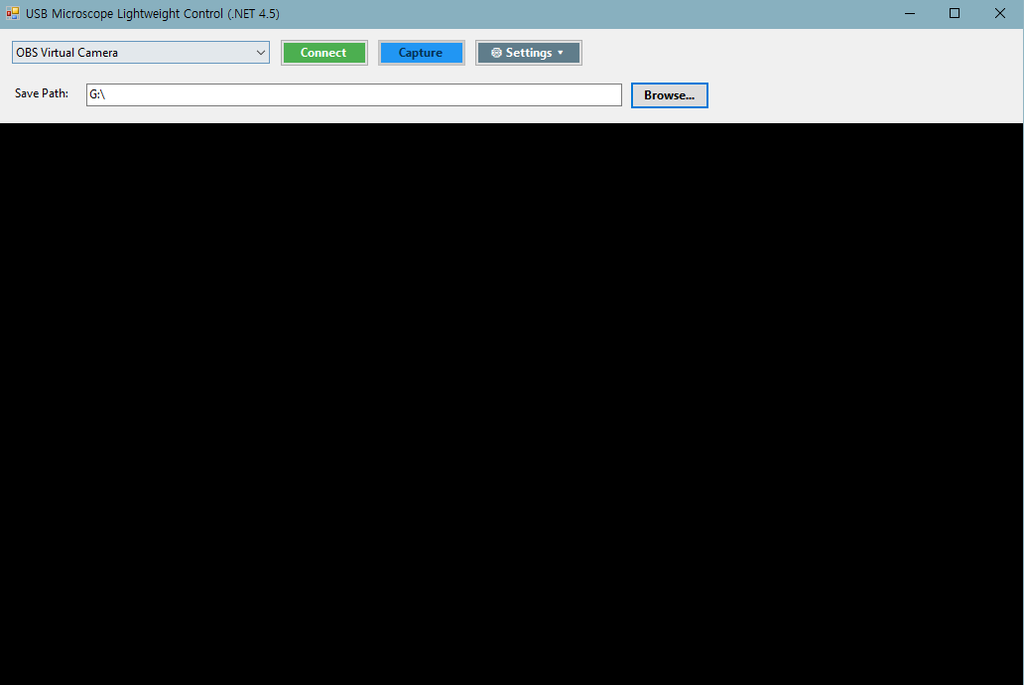
위와 같이 실행되며, USB 카메라 연결시 자동 식별 및 Connect를 통해 연결, 이미지 캡쳐가 가능합니다.
시판되는 전용 프로그램의 경우 전자현미경 등으로 사용하여, 전용 프로그램이 필수이지만, 일반 USB Camera를 단순히 사진 캡쳐 용도로 사용하기에는 위와 같이 가볍게 만드는 것도 나쁘지 않은 것으로 보입니다. 비슷한 목적의 툴을 고민하시는 분들께 작은 도움이 되었으면 좋겠습니다.
다음에는 더 유익한 팁으로 찾아오겠습니다.
감사합니다
답글 남기기